
TradingView never shipped a public API. The official Remix MCP closes that gap. Connect it to Claude Code or Cursor and pull quotes, technicals, and full SMC structure straight into chat. We tested it on a Premium account: prices track the live chart within 0.13% and refresh on every call, but the server is read-only and can’t report its own usage. It is strong for analysis and research, and wrong for order execution.
💡 TL;DR / Summary - TradingView Remix MCP: Key Takeaways
- Live Data, Not Cache: Prices tracked the live chart within 0.13% and refreshed on every call — confirmed across back-to-back requests.
- Headless SMC:
analyze_smc_toolcomputed BOS, CHoCH, order blocks, and premium/discount equilibrium from raw OHLCV — no indicator overlay needed.- Strictly Read-Only: No write tools exist. Alerts, watchlist edits, and paper trades require the chart or Chrome extension. The MCP cannot report its own rate-limit consumption.
Why a TradingView MCP exists at all
For years, getting data out of TradingView meant a browser tab or a scraper. There was no public API. Open-source bridges showed up to fill the hole, but they leaned on undocumented endpoints and sat uneasily against the terms of service. The Remix MCP is the sanctioned version: a hosted server that speaks the Model Context Protocol, so any MCP client can call it without a browser in the loop.
There are two halves to the product. The Chrome extension rides alongside a real TradingView tab and can drive the chart — draw, set alerts, place paper trades. The MCP is the headless half: data only, no tab, no rendering. This article is about the MCP. If you’re new to Remix itself, the TradingView Remix complete guide covers the basics first.
What the Remix MCP is (and isn’t)
The MCP is a single hosted endpoint. It serves quotes, indicators, OHLCV bars, screener results, SMC structure, news, calendars, and options. It does not touch your chart and does not run code on TradingView’s side beyond reading.
It speaks standard MCP over HTTP, so the same endpoint works in Claude Code, Claude Desktop, Cursor, and other MCP-aware clients. That portability matters: you wire it once and the tools show up wherever you work.
Connecting it to Claude Code or Cursor
There are two ways to authenticate. Clients with a Custom Connector dialog (Claude Desktop, Claude.ai web) use OAuth — paste the URL, approve in the browser, done, tokens rotate on their own. CLI and IDE clients (Cursor, and as it turns out Claude Code) use an API key as a Bearer header.
One snag cost us a few minutes. tvremix documents a Claude Code plugin install. Our Claude Code build had no plugin system and rejected the command outright. The fix is the standard MCP path:
claude mcp add --transport http tvremix https://tvremix.xyz/api/mcp/v1 --header "Authorization: Bearer <your-key>"
Generate the key first on the tvremix account page (it shows once — copy it then). After claude mcp add, restart Claude Code so the server loads, and confirm with claude mcp list showing tvremix connected. The server stored itself in the project-scoped config, which is a quiet win: the tools only appear inside that project directory, so they stay out of unrelated repos.
If you expose a key by accident — in a screenshot, a shared log — rotate it from the account page. We did exactly that mid-setup.
Accuracy and freshness, tested
The first call returned a clean snapshot for BINANCE:BTCUSDT (the symbol needs an exchange prefix). To check it, we opened the same pair’s 1-hour chart in TradingView at the same moment.
| Call | Price | RSI(14) 1h | Signal |
|---|---|---|---|
| tvremix, call 1 | $62,808.33 | 38.51 | Sell |
| tvremix, call 2 | $62,701.78 | 37.72 | Strong Sell |
| TradingView chart | $62,780.88 | — | Sell |
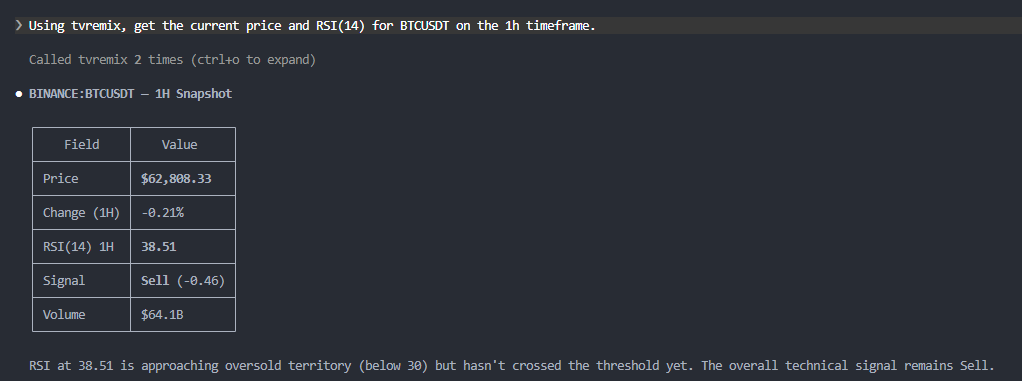
Two findings come out of this small table. First, accuracy: tvremix’s $62,701.78 against the chart’s $62,780.88 is a $79 gap, or 0.13%. The larger gap you might see against a USD index quote ($63,637 elsewhere) is just the USDT pair versus the USD index, not an error. Second, freshness: between two back-to-back calls the price fell, RSI dropped, and the rating hardened from Sell to Strong Sell. The data moves call to call. It is live, not a stale cache.
SMC structure without indicators
Asking for a Smart Money Concepts read triggered a different, dedicated analyzer — not the indicator tool. It returned market structure (BOS, CHoCH, swing points labeled HH/HL/LH/LL), order blocks with mitigation status, a premium/discount map, and unfilled fair value gaps.
We spot-checked the math rather than trusting the label. The premium/discount equilibrium came back at $69,731. The strong high was $78,080 and the weak low $61,383. The midpoint of those two is exactly $69,731. The analyzer is computing levels, not printing decoration. It also reached past the visible chart window to find the strong high from late May, so it works off a multi-bar history rather than whatever is on screen.
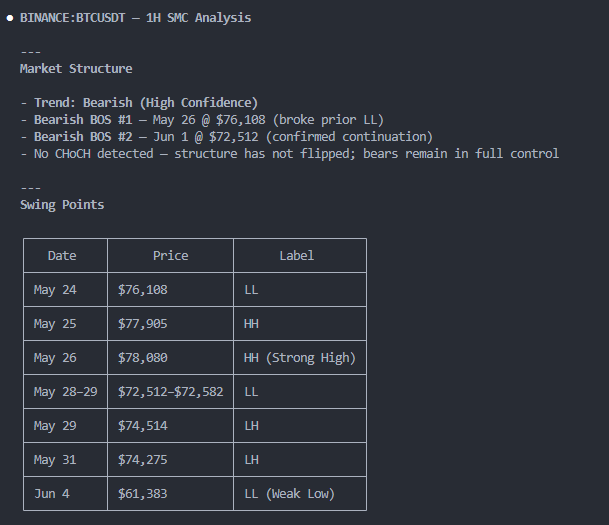
This is the interesting contrast with a charting indicator like LuxAlgo. An indicator draws structure as an overlay on your chart; the MCP computes the same structure headless and hands back numbers. Same SMC vocabulary, opposite path. For a deeper comparison of the indicator route, see our Remix vs LuxAlgo SMC write-up.
Full tool catalog
The sections above cover what we measured directly: quotes, technicals, SMC structure, and the write boundary. The server exposes a wider catalog than what the official page lists — below is the full documented set, with a note on what each category covers. Being on this list means the server claims to support it, not that we independently verified it.
| Category | Key tools | What they cover |
|---|---|---|
| Quotes & prices | get_quote, get_quotes_batch (≤50), get_ohlcv | Live and historical price data for any symbol — spot, futures, forex, crypto |
| Technicals | get_technicals, get_full_technicals (multi-TF), ratings | Indicator values and buy/sell signals across timeframes in a single call |
| SMC & swing structure | analyze_smc_tool, analyze_swing_tool, compute_levels_batch | Market structure (BOS, CHoCH), order blocks, FVGs, premium/discount levels — computed headless from raw OHLCV |
| Screener & ranking | run_screener, filter_by_indicator, rank_symbol_setups, analyze_sector | Filter and rank symbols by indicator conditions across an entire market |
| Comparison & correlation | compare_symbols, calculate_correlation (Pearson OHLCV) | Side-by-side symbol performance and statistical correlation between pairs |
| Options | get_option_chain (with Greeks), expiration calendar, strategy scan | Full option chain with delta, gamma, theta; strategy builder and scanner |
| Fundamentals | get_financials, get_forecasts, get_documents (SEC 10-K/Q/8-K) | Earnings, revenue, forecasts, and SEC filings for US-listed equities |
| Calendars | Earnings, economic events, dividends | Upcoming market-moving events — earnings dates, central bank decisions, ex-dividends |
| News & web | get_news, get_news_story, web_search | Symbol-specific headlines, full article text, and general web search |
| Account (my_*) | my_watchlists, my_watchlist_symbols, my_alerts, my_charts | Read-only access to your TradingView watchlists and alerts when account is linked |
| Meta & telemetry | search_symbols, get_symbol_data, report_session_intent, report_outcome | Symbol search, metadata lookups, and usage signals sent back to the tvremix service |
What it won’t do: the boundary
The MCP has no write tools. Asking it to create a price alert returned a plain refusal — there is no create-alert tool — followed by instructions to set the alert in TradingView itself. It will read your existing alerts, but it cannot make or change one.

“Read-only” is close but loose. The accurate version: the MCP reads everything (quotes, structure, your existing alerts and watchlists) and writes nothing. Writes — alerts, watchlist edits, paper trades — go through the chart or the extension. Data layer and execution layer are split on purpose, and that split means the MCP never threatens your account state.
Usage sits on the wrong side of the same line. There is no tool to query your rate-limit quota or billing from inside the agent. The MCP can’t report its own consumption; you check that on the dashboard. The published limits are 20 calls per minute, 200 per hour, and 1,500 per day per key, and an over-limit call returns a 429 with a Retry-After header.
“Rate limits apply per API key: 20 requests/minute, 200 requests/hour, 1,500 requests/day. Exceeding the limit returns HTTP 429 with a Retry-After header. Usage quota and billing are visible only via the tvremix account dashboard — no in-session query tool exists.” — tvremix official documentation
Privacy: the my_* tools
Connecting your TradingView account unlocks a set of my_* tools — your watchlists, your alerts, read-only. They worked in our session and pulled real account state into the agent’s context.
That convenience has a cost. Once those tools are live, whatever agent you’re running can see your watchlists and alerts — in plain terms, your positions and your intent. If you screenshot or share a session, that leaks. Mask my_* output before publishing, and treat the account link as exposure, not just a feature.
FAQ
Is the Remix MCP free? Yes, during the public beta. Rate limits apply per key.
Do I need a paid TradingView plan? No, but your plan sets a usage multiplier — higher tiers get more headroom. Pine and most data work on the free tier with a smaller allowance.
OAuth or API key — which? If your client has a Connector dialog (Claude Desktop, Claude.ai web), use OAuth. For Cursor, Claude Code, or any JSON-configured client, use an API key as a Bearer header. Same account either way.
Can the agent see my watchlists or positions? Only if you link your TradingView account in the extension. Then the my_* tools expose that state, read-only. Don’t link it if you’d rather keep it private.
Can it place trades or set alerts? No. The MCP is read-only. Alerts, watchlist edits, and paper trades go through the chart or the Chrome extension.
Does it work in Cursor and other clients? Yes. It’s a standard MCP server over HTTP, so Cursor, Windsurf, Cline, and similar clients use the same endpoint plus OAuth or a key.
Updates & changelog
- 2026-06-05 — First test pass on a Premium account: connection, accuracy, freshness, SMC, write boundary, and privacy. tvremix is in public beta; behavior may shift.
Who this is for
The Remix MCP earns its place in analysis and research: pulling live quotes into a thesis, checking structure across symbols, feeding real bars to an agent that reasons over them. It is not built for tick-precise execution or anything automated — the cache is measured in seconds to hours, and there are no write tools.
Before you rely on it, a short checklist:
- Mask
my_*output in anything you publish or share. - Rotate any key that lands in a screenshot or log.
- Keep the server project-scoped so it doesn’t bleed into other work.
- For order placement, stay in the chart. The MCP is for reading.
Educational content, not financial advice.